This post details the Query & Update Data in JM Dataverse Toobelt
This is the most commonly used feature in this app and can be used to achieve any of the following
- Arbitrarily query data for any record type in the Dataverse instance
- Bulk update columns for the results of a query
- Bulk delete results of a query
- Bulk replace text in string fields for the results of a query
- Copy FetchXml for the query to the clipboard either raw or formatted for JavaScript
- Display total number of records for a query
- Export query results to Excel
- Open result in an editable form containing all columns in the table
- Open results in the Model Driven Web UI
To run a query click the Query & Update button in the main menu. Once loaded select a record type and a query can then be created using a range of conditions, operators and joins
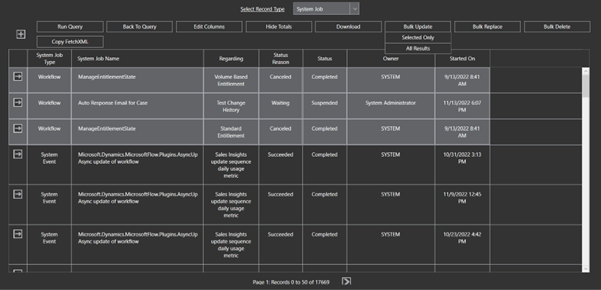
After the Query is run results are displayed in grid form with operations available to perform on the results
In this screenshot I have also clicked Display Totals and the total number of records is displaying in the age count at the bottom of the grid
Further documentation of bulk update and the other features available on query results are TBD
 JM SOFTWARE