This page details base configuration needed for the Field Change History solution. The outcome is a Field Change Settings record with global settings for the solution. After the Field Change Settings record has been created, Field Change Configuration records can then be created to specify which columns the solution will track changes to.
Create Service Account
It is recommended for this solution to configure Field Change History records to be created by a service account. This means general users do not require security privileges on the Field Change History table for changes to be captured, and if users need to view these records, read access is sufficient.
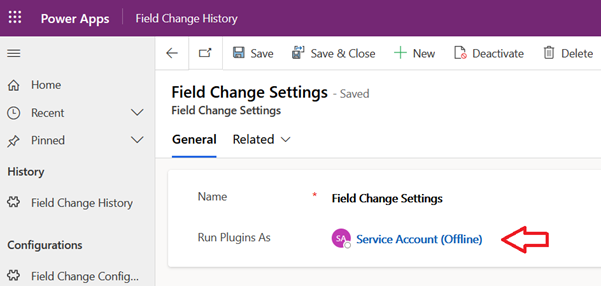
The service account is configured in the Field Change Settings record. When populated with the service account user, all plugins which create, and update Field Change History records based on user activity, will execute in the context of that service account user.
If a service account does not already exist, one can be created using the approach in either of the following Microsoft articles:
The service account will need sufficient privileges to create Field Change History records. Granting system administrator to the service account is the simplest approach, but if the principal of least privilege needs to be adhered to then the following are necessary entity permissions:
- Read and Append To privilege on all tables which Field Change History will be captured for.
- Create, Read, Write, Append, and Append To privilege on the Field Change History table.
Create Field Change Settings record
These steps detail configuring the service account for the Field Change History plugins. This assumes the service account has been created according to the above information
- Login into the Dataverse instance as a System Administrator.
- Open the App named “JM Dataverse Toolbelt”.
- In the left-hand menu Field Change History group click to view Settings
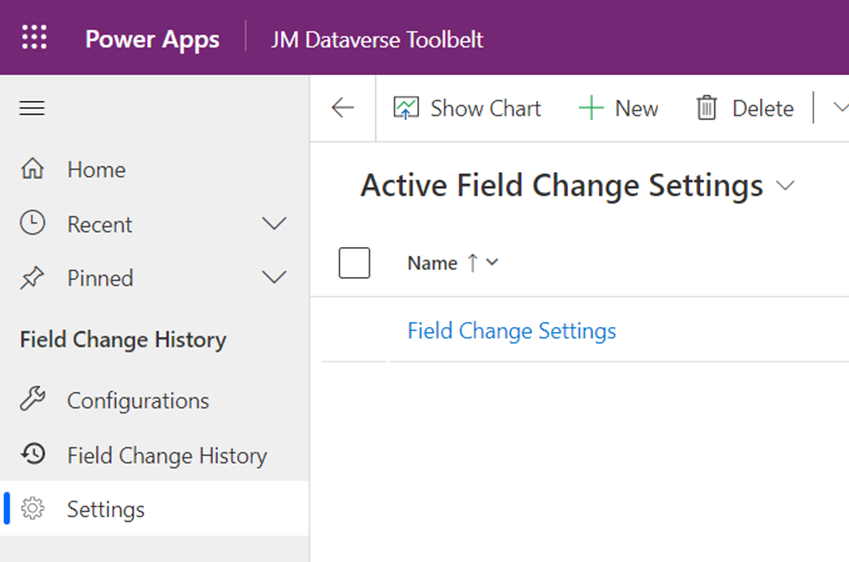
- If there is an existing Field Change Settings record open it, otherwise click to create a new Field Change Settings record. Note there should only be one Field Change Settings record created for the Dataverse instance. This record is required for Field Change Configuration plugins to capture Field Change Events.
- In the Field Change Settings record set the field named Run Plugins As to the relevant service account.
 JM SOFTWARE