This feature generates Field Change History records from the audit history.
Using this feature, rather than only starting to capture history at the time Field Change Configuration is created, historical changes in the audit history can be copied into Field Change History records.
Pre-requisites:
- Audit is turned on for the Dataverse instance.
- The table and column which the Field Change Configuration tracks have audit turned on.
- There is audit history which includes changes to the column which the Field Change Configuration tracks changes to.
Triggering Generation
To generate Field Change History for a Field Change Configuration
- Login into the Dataverse instance as a System Administrator.
- Open the App named “JM Dataverse Toolbelt”.
- Click to view Field Change Configurations in the left-hand menu and open the Field Change Configuration to generate history for.
- Click to view the Generate History tab.
- Click the checkbox labelled Generate and save the form.
- Further down the form a System Job will start which generates the Field Change History records. Wait for this and any subsequent jobs created to change to complete.

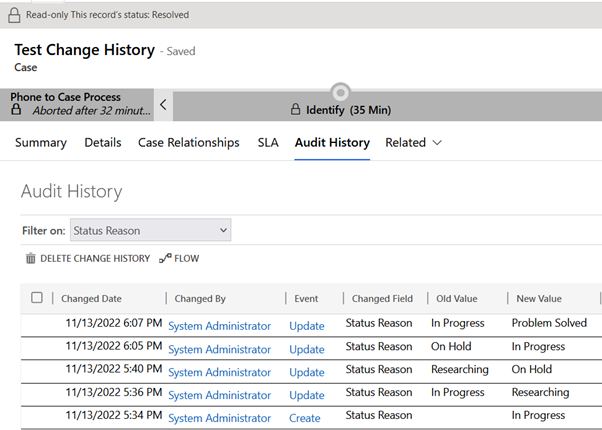
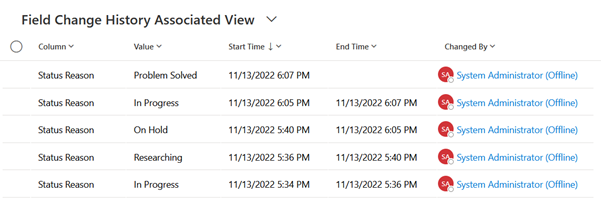
This screenshot shows example Audit History on a Case record, with the subsequent screenshot showing Field Change History created by the generation process on that case.
Recovering Generation Failure
On occasion, the process which generates Field Change History from audit history can fail for transient infrastructure reasons when there is a large volume of data to generate.
The process generating the data is a recursive workflow which generates history records in timeboxes of no more than two minutes each. If an operation fails due to an unexpected error, that will cause the generation process to fail.
For a transient error this is not a terminal problem. The generation process can be resumed by repeating the process of setting and saving the “Generate” field on the field change configuration form.
Since the process uses an anchor field “Last Generation Creation Date” it will start a new system job and resume where it left off. There is also logic within the process to prevent duplicates being created for the same field change occurrence when the process resumes.
 JM SOFTWARE