The Solution Template feature of the extension is a visual studio starter solution containing several projects for Dataverse development purposes.
New solutions created from the template contain the following projects all connected to an active Dataverse instance
- console app
- plugin project –
- web resource project
- automated test project
As well as the plugin framework which abstracts out some of the low level plugin code, a range of class libraries and service classes simplify coding against the SDK to enable quicker outcomes and more maintainable code
To create a solution from the template use the standard new project dialog in Visual Studio. Typing JosephM into the search box for the new project type will bring uo the solution template for selection

When entering the project name and location ensure “Please solution and project in the same directory” is unchecked. If it is checked the solution will not provision correctly

Provisioning of the project first requires the Dataverse instance connection to be entered
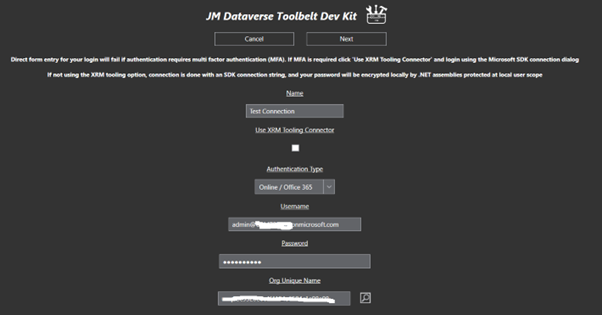
Then a form which includes details for Class Prefix and Customisation Prefix. These are used for initialising names of web resources and classes in the new projects

Click Next to provision the new solution. The screenshot below shows an example new solution created form the template

Template Console Project
The console project in the template provides a console app with a preloaded connection to the Dataverse instance
As the project has a reference to the Plugin project for the template, it has access to a range of classes which simplify coding activities using the Dataverse SDK
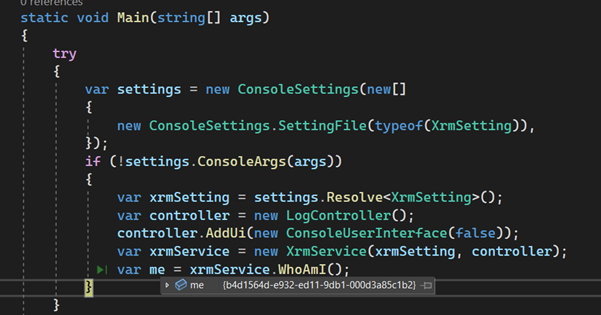
The screenshot below shows the initial state of the console app. As you can see the app is immediately connected to the Dataverse so provides a great starting point for a console app
Plugin Project
The plugin project in the template provides a framework for custom plugins, workflow activities, and custom actions, as well as a range of classes which simplify coding activities using the Dataverse SDK.
The screenshot below shows the plugin project a created by the solution template
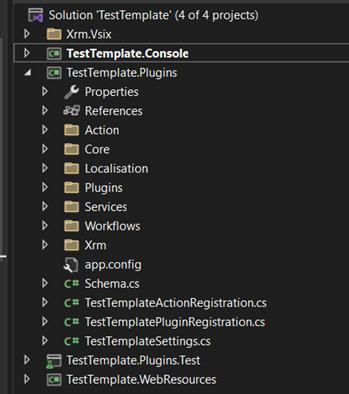
Classes and details of the plugin project will not be documented here and other options should be well thought through before committing to writing new custom plugin code
Test Project
The test project in the template provides a framework for automated testing of behaviour in the Dataverse instance. The testing framework uses the active connection of the extension so is great for quickly writing new tests, and running regressions scripts, of plugins and other behaviours which have been customised into the platform
As the project has a reference to the Plugin project for the template, it has access to a range of classes which simplify coding activities using the Dataverse SDK
The screenshot below shows the test project a created by the solution template

Classes and details of the test project will not be documented here and other options should be well thought through before committing to writing custom code for the platform
Web Resources Project
The web resources project in the template provides a JavaScript utility classes for customising behaviour in the Dataverse forms
The screenshot below shows the web resource project a created by the solution template

The JavaScript files will not be documented here and other options should be well thought through before committing to writing custom code for the platform
Item Templates
The extension also contains several classes intended for use with frameworks in the solution template project
These are accessible in the XRM category of the new project item dialog

These items will not be documented here and other options should be well thought through before committing to writing custom code for the platform
 JM SOFTWARE