This feature is the main process for creating a release package in a visual studio solution
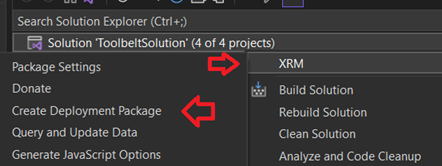
The Create Deployment Package button is made available by right clicking a solution in solution explorer, then locating it in the XRM submenu
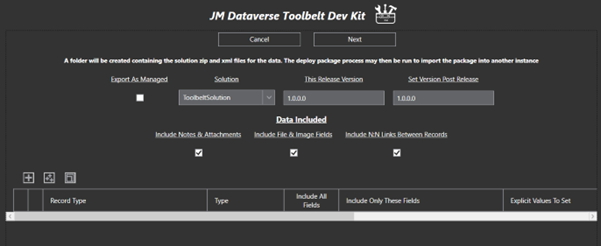
The Create Deployment Package form has main options for the solution to add into the package, then further down a grid with options for inclusion of data along with the release
- Setting This Release Version will set the selected solution version prior to the export
- Setting Set Version Post Release will update the solution version after export
To include data in the package click the + button at the top left of the grid, or use the multi + button to select and add multiple types in one go
Once types are selected for inclusion the set of table rows and columns included in the package can be filtered. Change the Type selection from All Records to limit records included, and deselect Include All Fields to select a limited columns in each record
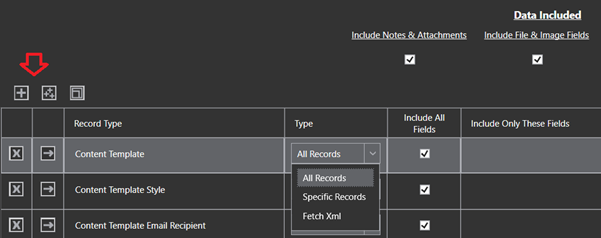
Where Specific Records is selected for the type, the extensions query dialog will be opened for selecting which specific records to include

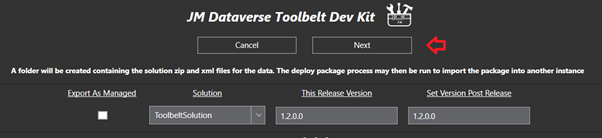
Once satisfied with the solution details and data to include, click Next to initiate creation of the release package

The process may take a minute to export the release package depending on performance of the instance
This screenshot shows an example release folder created by the process. Note the folder has been named according to the solution version, and there are xml files in the Data folder for each record which has been included in the package

The Create Deployment Package process may be run any number of times to update the solution and data in the package
As is often the case additional solutions, files, and release notes need to be included in a holistic release package. There is no issue in adding additional folders and files into the release version folder to keep these all together. This won’t break any deployment process unless zip files are added, or incorrect xml files are added to the Data folder
 JM SOFTWARE