More commonly used in the toolbelt desktop app, this feature can be used to achieve any of the following
- Arbitrarily query data for any record type in the Dataverse instance
- Bulk update columns for the results of a query
- Bulk delete results of a query
- Bulk replace text in string fields for the results of a query
- Copy FetchXml for the query to the clipboard either raw or formatted for JavaScript
- Display total number of records for a query
- Export query results to Excel
- Open result in an editable form containing all columns in the table
- Open results in the Model Driven Web UI
To run the query dialog right click the solution and select Query and Update Data in the XRM menu
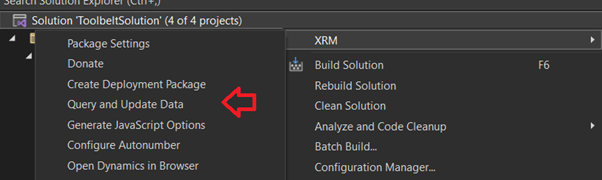
Once loaded select a record type and a query can then be created using a range of conditions, operators and joins

After the Query is run results are displayed in grid form with operations available to perform on the results
In this screenshot I have also clicked Display Totals and the total number of records is displaying in the age count at the bottom of the grid
 JM SOFTWARE