This feature of the extension enables configuration of plugin triggers (SDK Message Processing Steps) for a plugin assembly in the Dataverse instance
The Manage Plugin Triggers button is made available in the XRM menu when a project is right-clicked in solution explorer

When the Manage Plugin Triggers process is initiated the extension will
- Verify there is a matching Plugin Assembly deployed to the active instance
- Query SDK Message Processing Steps in the active instance for that Plugin Assembly
- Load the form for creating and managing the plugin triggers
To add a new plugin trigger (SDK Message Processing Step) click the + button at the top left of the grid

This loads the form for entering details for the new plugin trigger. The properties should be familiar for a learned Dataverse programmer, otherwise see Microsoft documentation for further details on Dataverse Plugins
https://learn.microsoft.com/en-us/power-apps/developer/data-platform/plug-ins?WT.mc_id=DX-MVP-5004940
Note only PreImages are currently available for configuration in the extension as PostImages are considered an anti-pattern by the publisher, and the Target and PreImage in plugins is used to achieve the same result
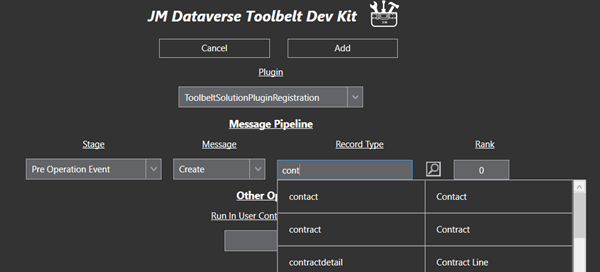
Once all required SDK Message information has been entered click Save to commit the changes into the Dataverse instance for the active connection

Progress information will be displayed as changes are save
At completion a summary of updates will be displayed

The Manage Plugin Triggers process may be run again on the plugin project as required to add new plugin triggers, delete plugin triggers, or update plugin trigger configurations
 JM SOFTWARE