This is another well-used feature of the extension which generates static classes and constants for the types, fields, option sets, and action endpoints which are configured in the Dataverse instance
The Refresh Schema button is made available by right clicking a file which has the name “Schema.cs” in solution explorer
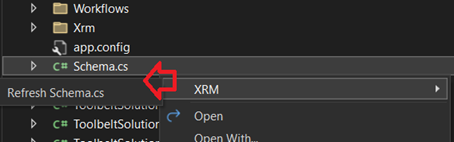
Running this process will refresh the schema.cs file with classes and constants based on the current state of the Dataverse instance. The refresh may take a while as all metadata is refresh from the source instance to ensure customisations are up to date

Classes in the generated file enable greater efficiency writing code with the Dataverse SDK, by using the Intellisense feature of Visual Studio, instead of manually typing strings for customisation values
Code will also naturally become more maintainable as constants have managed code references, option values are represented as labels, as well as other benefits of using constants instead of hard values
Constants types generated include the following
- Table logical names
- Column logical names
- Field option sets
- Shares option sets
- Custom actions along with their input and output arguments
- Many-to-many relationship logical names
The screenshots below show example constants and type ahead from the Schema.cs file
Constants in the static Entities class for table logical names
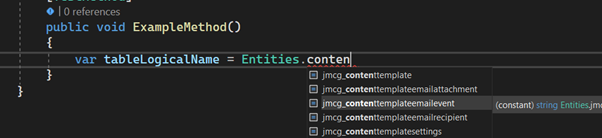
Constants in the static Fields class for column logical names

Constants in the static OptionSets class for column option values

Constants in the static OptionSets.Shared class for shared option values

Constants in the Action class for custom action names

Constants in the static Actions class for custom action inout and output arguments
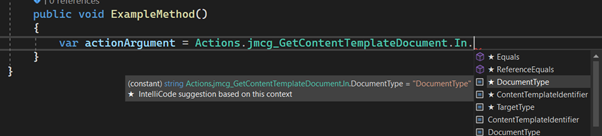
And finally in the static Relationships class many-to-many relationship names and intersect table names
 JM SOFTWARE