This feature of the extension deploys plugins assembles along its plugin types into the Datavere platform
The Deploy Plugin Assembly button is made available in the XRM menu when a project is right-clicked in solution explorer
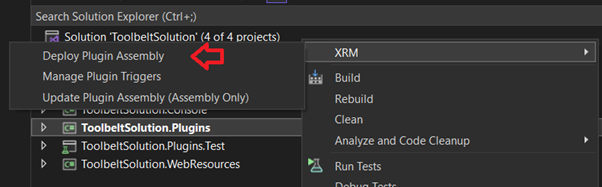
When the Deploy Plugin Assembly process is initiated the extension will
- Trigger a build of the plugin project
- Verify the assembly is signed
- Load the assembly and search for Plugin and CodeActivity (Custom Workflow Activity) classes
- Query the active instance for presence of matching Plugin Assembly and Plugin Type records
- Load the form to confirm details of the assembly deployment
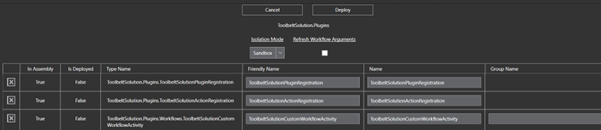
This form has deployment options including
- Isolation Mode – change the Assemblies Isolation Mode to None (on premise only)
- Refresh Workflow Arguments – if ticket the deployment process will set a field on each Plugin Type already deployed intended to refresh all Input and Output Argumenta based on the updated assembly classes. If not ticked where Input and Output arguments have changed the Plugin Types may not update adequately
- Friendly Name – name used for plugins in the Dataverse platform
- Name – other named used for plugins in the Dataverse platform
- Group Name – menu group the custom workflow activity is displayed in when configuring in Workflows-
Click Deploy on the form and the extension will work through required data updates to deploy the assembly and types into the Dataverse platform

At completion a summery of updates will be displayed

The Deploy Plugin Assembly process may be run again on the plugin project as required to add new plugins or workflow activities, delete the plugins or workflow activities, or update their configurations
 JM SOFTWARE