Headers and Footers are defined in Content Template Style records to apply a consistent header and footer into content without having to repeat and define it within each template
For documents header and footer options include the ability to configure different headers and footers for the first and remaining pages
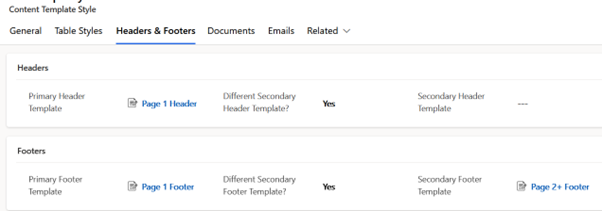
The screenshot below shows an example configuration where
- The first page header is defined as Page 1 Header
- All pages after the first page do not have a header
- The first page footer is defined as Page 1 Footer
- All pages after the first page use Page 2+ Footer
Header and Footer record referenced by these configurations are defined as Content Templates of type Header, or type Footer. Content templates of these types have different options to other templates, where rather than being HTML content they have options to be a standalone image, or splitting content horizontally into combinations of text and images
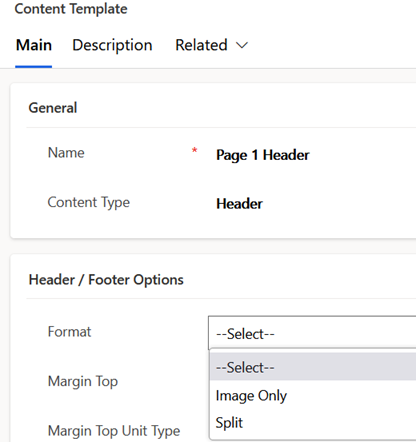
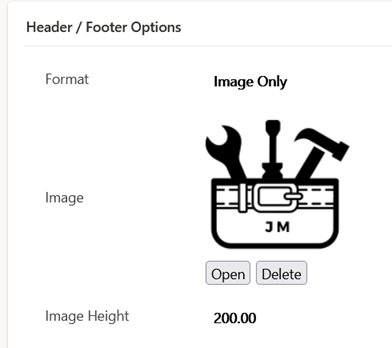
Where Image Only is used for documents, then the image width will be measured to fit the width of the page minus left and right margins, and the height may need to be configured to retain the desired aspect ratio
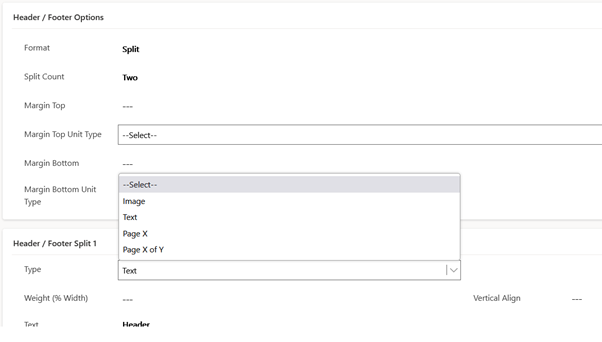
Where Split is used, then up to 2 splits are allowed with each configured as either an image, text, or page information. Each can also include relative widths weightings to increase or decrease the width covered by each split
 JM SOFTWARE