SharePoint Folder Configuration records are used to define the hierarchy of folders in SharePoint, and documents can be configured to be placed in folders within that hierarchy for their source record. This features also supports auto-creation of folders when records of relevant types are created
Folder Configurations can be of 3 types
- Document Library – A SharePoint document library in which folders and documents will be located. This is always the top level of each document hierarchy
- Record Main Folder – A SharePoint folder which is the main location of documents for a specific record. If the relevant table has document integration on, then document location records will be created for the folder to enable native SharePoint integration points
- Record Sub-folder – A SharePoint folder inside a Record Main Folder. This could be for a specific category of documents for the parent folders record type, or could be for a ‘child’ table, and contain folders or documents for records which are related to the parent folder type through a lookup column
Record Main Folders and Record Sub-folders can contain tokens in their name, so folders names are dynamically generated based on columns in the source records. These tokens have the same pattern as Field Tokens in HTML content
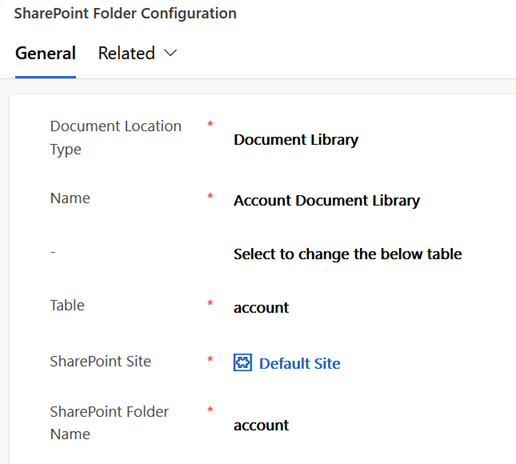
To create SharePoint folder configurations for a type, a root document library configuration always needs to be present as the top level of the folder hierarchy. The screenshot below shows an example document library configuration for the account type. Note that SharePoint folder name should in general be the same as the table logical name unless there as an unusual alternate requirement
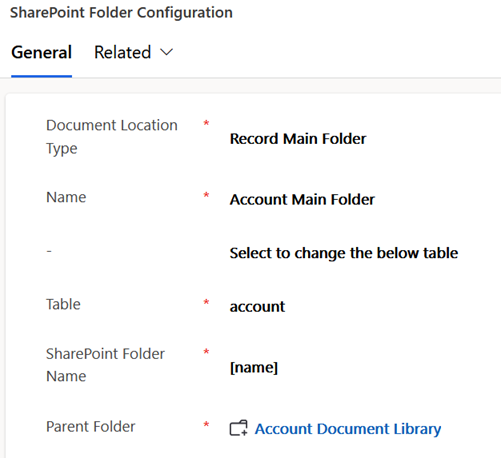
The screenshot below shows configuration of a folder which would be created for each account’s documents. It is the child of the document library and a folder gets created in the document library for each account
Note the SharePoint folder name uses a field token so it will be named according to the account name
The next section has an additional configuration to match any document location. By default, when processing integrations the system will look for an existing folder with a name match. Setting this field means if the accounts name changes, then any folder already created for the account will be considered as a match for this configuration as opposed to a new folder being created with the name

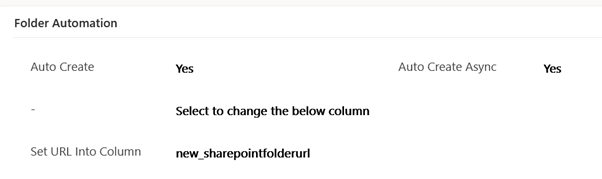
The next folder automation section has additional options to auto create the folder when an account is created. This example will asynchronously auto create the folder when each account record created. It’s also configured to populate the absolute URL of the SharePoint folder into a custom field
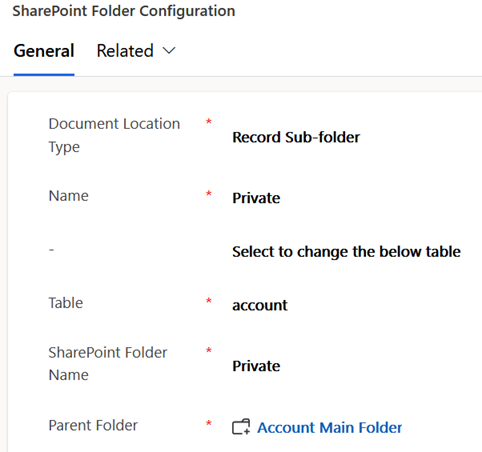
The screenshot below shows configuration of a subfolder created inside each accounts main folder
The next section also contains a configuration default folder for type which specifies any document which doesn’t have an explicit SharePoint folder configured should be placed in this folder when generated in SharePoint

The screenshot below shows the folder hierarchy configured above for account records. In this case each accounts folder has a Private and Public sub-folder, and documents will be uploaded into the private folder where none is explicitly selected on the template

 JM SOFTWARE