Email events are configured inside templates on the email automation tab to automate events where they will be sent as email. Using these configurations mean email events are managed in the same place as their templates, and are more easily located when compared to other configuration options
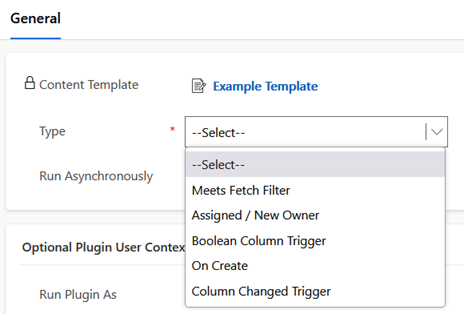
Configurations options for email events are as listed below
- Meets Fetch Filter – a FetchXml filter can be configured and when the source record transitions to meet the state of the filter an email will be triggered. Optionally a precondition filter may also be defined
- Assigned / New Owner – an email will be sent when the record is assigned to a new user, and that same user did not assign it. This is intended for notifications to a user who is assigned a record
- Boolean Column Trigger – an email is sent when a boolean type field is set to true. This event will also set the field back to false after the event
- On Create – an email is sent when a record of the source type is created. Optionally a FetchXml filter can be defined to limit records which the email will be sent for
- Column Changed Trigger – an email event will be triggered when a configured columns value is changed. Optionally a FetchXml filter can also be defined to limit when the email is sent
Note in email event scenarios, if email parties during an event are found to now be populated, or not have an email address populated, then the email event will be skipped and not sent. The system will not raise errors in these cases unless they are configured as a Required Recipient.
The following example details a content template email event sending a notification to a customer when a case is closed. For this example, a Content Template with the following main configurations

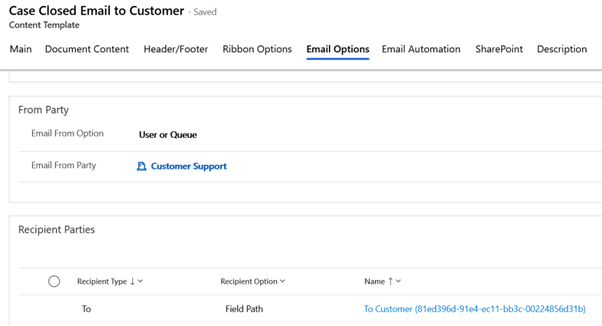
The Email Options tab is also configured with a queue for sending the email, and the customer to receive the email
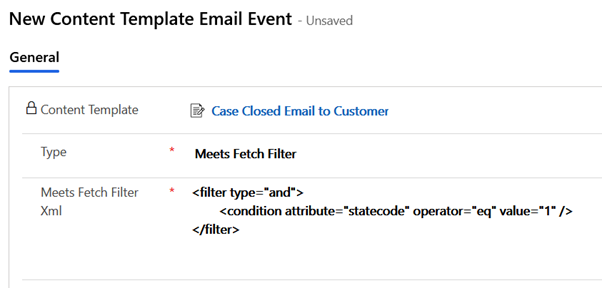
Now for the email Event – in the Email Automation tab an email event record is added to the grid

In the Email Event the type is Meets Fetch Filter and the FetchXml filter defines a closed case
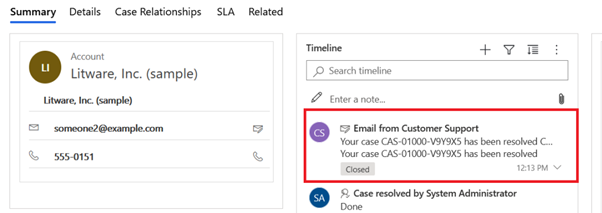
After creating these configurations and closing a case see the email has been created and sent to the customer
 JM SOFTWARE