Category Archives: Managed Solution

PCF Form Message Solution

This solution contains a PCF control for displaying an informational message on a Model Driven App form

This PCF control was created to solve a limitation on quick create forms, where an information message could not be displayed inline on a quick create form. This PCF control solves that by binding to a multi line string field which should be set to the html for rendering in the message

The solution for this PCF control can be found here, and the code repository here

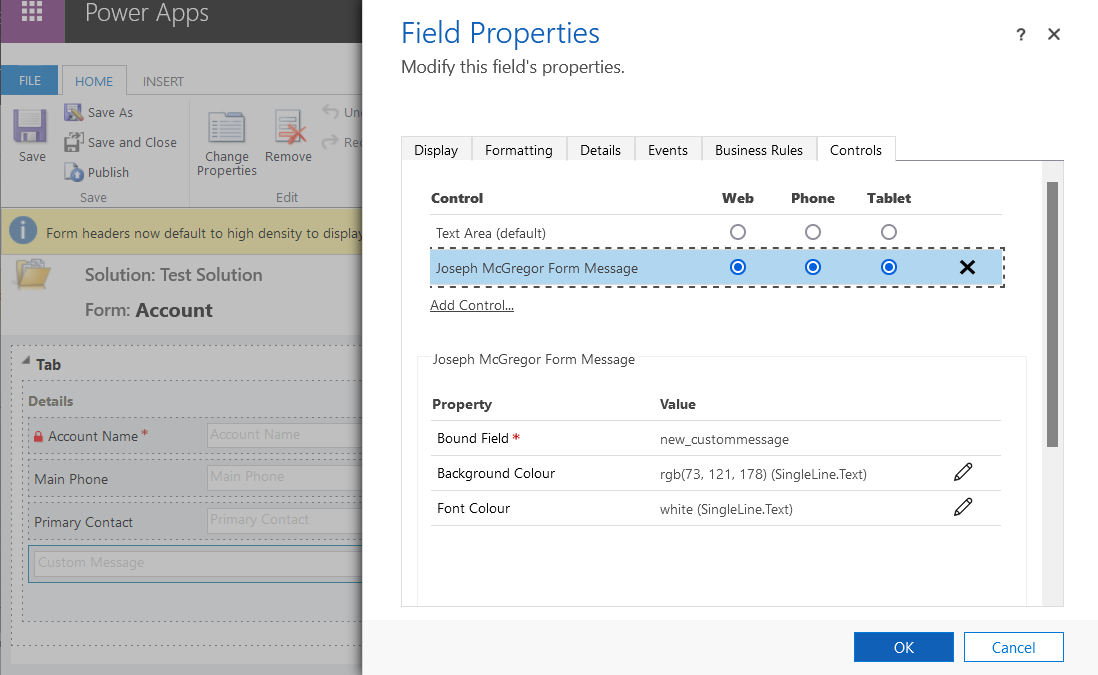
This screenshot shows a field Custom Message field configured to use the PCF control
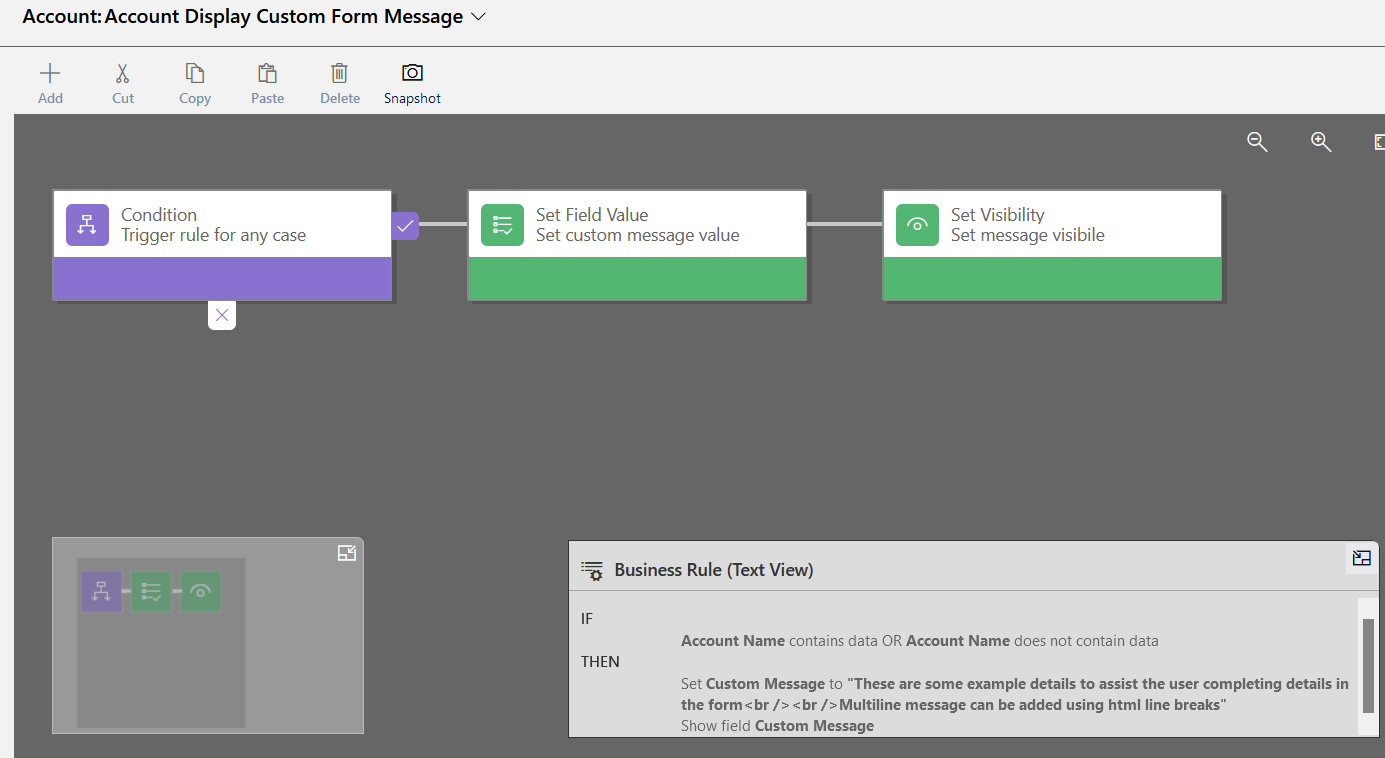
For the purposes of an example message this Business Rule triggers on account forms to populate the HTML into the Custom Message field. Note this gives the flexibility to display contextual messages with relevant field information
This screenshot shows the PCF control displaying a message on the quick create form. As you can see this gives extra flexibility in displaying information to the user than standard configurations

If you have any questions on the implementation or use of this PCF control feel free to comment

Activity File Attacher Solution

This article details a micro solution for Dynamics 365 I have created and added to github here. A managed version of the dynamics 365 solution can be found here

The solution contains a web resource which may be added to the email and appointment forms to simplify adding file attachments. OOTB the attachments grid requires several clicks and forms for adding an attachment, and they need to be done one by one. This resource provides the ability to drag/drop, or select multiple files for attachment without requiring to go through the attachment dialog

Note I have not added the ability to remove, clear or perform any actions other than adding new attachments just to keep the resource simple

This solution was implemented on Microsoft Dynamics Version 8.2 and will not work on earlier versions

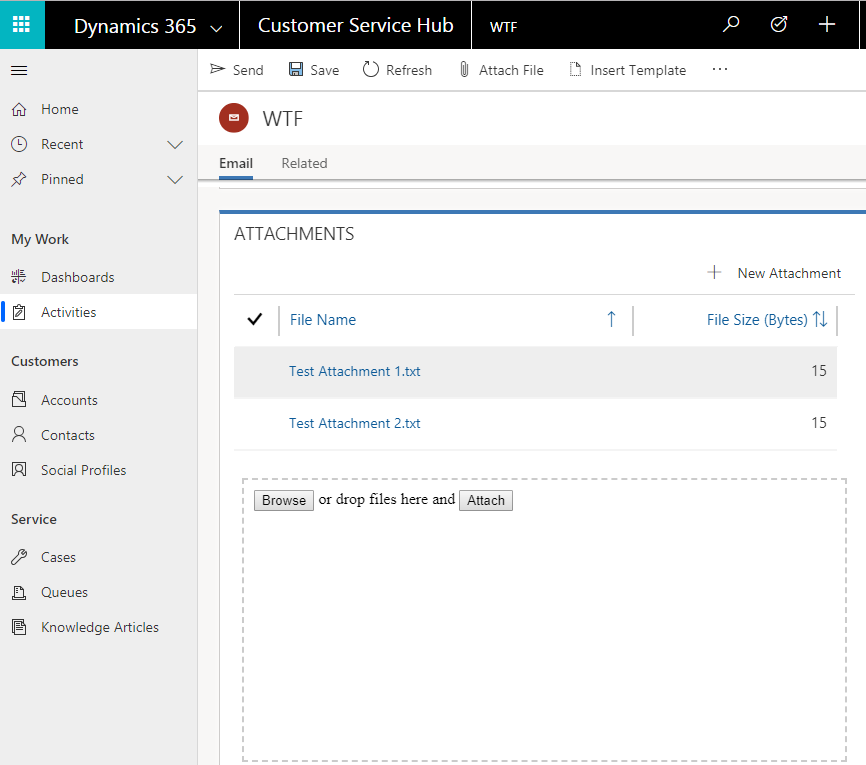
This screenshot shows the web resource in action in the Customer Service Hub. You see files may be dropped within the drop space, or selected using the Browse button. Once the files have been added in the web resource click Attach to add them to the Email

activity file attacher

Activity File Attacher Added.png

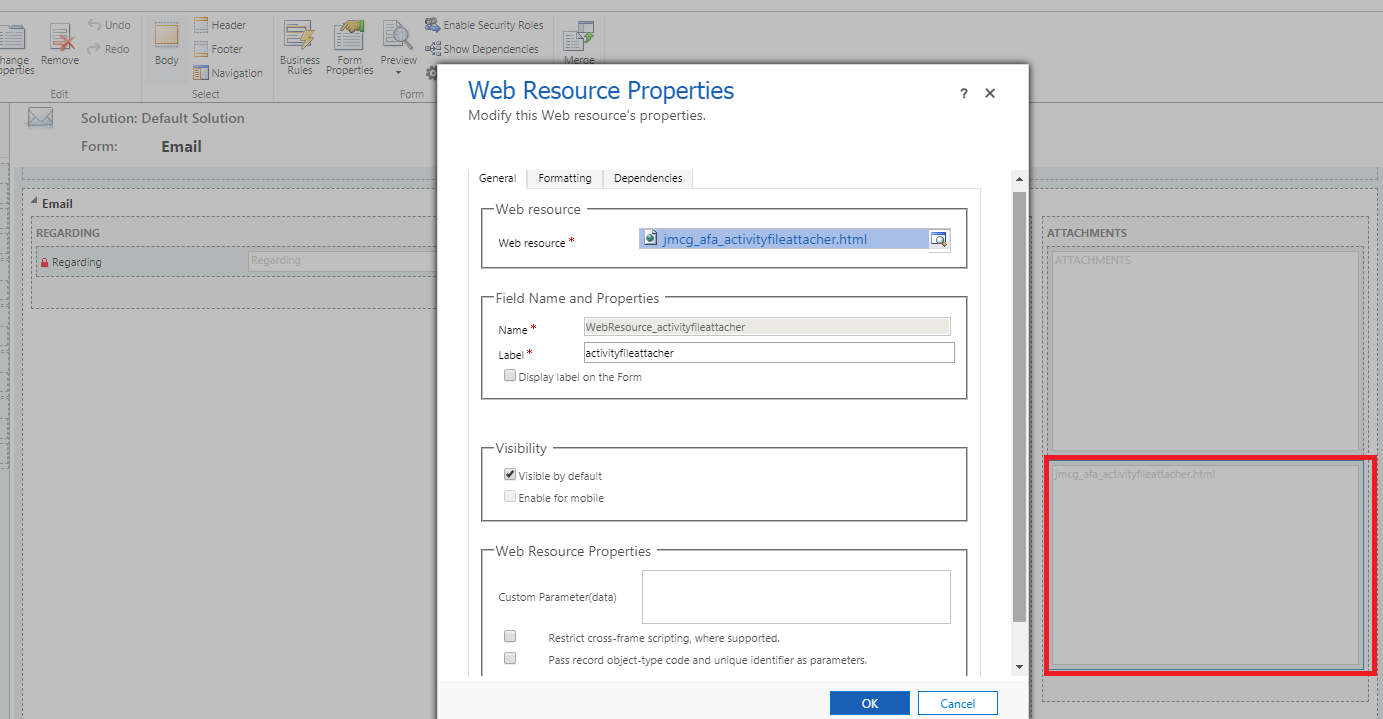
Configuration of the resource is shown in the screenshots below. The first screenshot shows I have inserted the web resource on the email form below the attachments grid.

Activity File Attacher Configuration.png

This second screenshot shows several relevant settings on the second tab of the web resource properties

Activity File Attacher Configuration 2.png

In terms of the implementation it is relatively basic. Jquery is used for manipulating html including the drag/drop capability, and the Dynamics 365 WebAPI is used to create the attachments when the Attach button is clicked

Feel free to grab the code off github and use it if you wish, otherwise if you are happy to use the solution as is just install the managed solution


Workflow Scheduler Solution

This post details a solution created for configuring workflows to run on a scheduled basis

The dynamics 365 component in the solution for configuring these recurring processes is a custom entity named Workflow Task. This can be scheduled to run continuously with a minimum duration of 10 minutes. That is they can be configured to run every X minutes, every X hours or every X days amongst other durations. They can also be configured to only run between certain hours of the day as well as to not run on weekends and public holidays

This table lists the different types of workflow tasks which can be created with some examples linked. Further examples will be added when time permits

TypePurpose
Target Per View ResultRuns workflows on records returned by a system view
View NotificationEmail notifications when records are returned by a system view, listing the records returned by that system view
Target This Workflow Taskworkflow which runs against the configuration record (generally calling a custom code activity)
View Has Results (Target This Workflow Task)workflow which runs against the configuration record only when a system view returns any results(generally calling a custom code activity)

Before finishing I will add these notes which need to be considered

  1. On rare occasions the workflow processes which implement this solution have failed for infrastructure related reasons. Monitoring processes which restart failed processes have been implemented into the solution and the stability has gradually improved to the point failures are now very rare. Nonetheless it is advised automated notifications or manual checks are done to ensure the solution processes are running. This is easily done by ensuring the workflow task execution and monitor times are all kept updated as future values
  2. It is possible to trigger custom code or integrations by creating custom workflow activities and adding them to target workflows
  3. The 2 minute time limit for sandboxed plugins needs to be considered for custom code scenarios. If your custom code is sandboxed ensure your logic is implemented to not exceed the 2 minute threshold or the workflow and its schedule will fail

If you have any questions about this solutions features feel free to post a question and I’ll try to provide an answer