Post superseded by Utility App
Category Archives: JM Dataverse Toolbelt
Dataverse Toolbelt Query & Update Data
This post details the Query & Update Data in JM Dataverse Toobelt
This is the most commonly used feature in this app and can be used to achieve any of the following
- Arbitrarily query data for any record type in the Dataverse instance
- Bulk update columns for the results of a query
- Bulk delete results of a query
- Bulk replace text in string fields for the results of a query
- Copy FetchXml for the query to the clipboard either raw or formatted for JavaScript
- Display total number of records for a query
- Export query results to Excel
- Open result in an editable form containing all columns in the table
- Open results in the Model Driven Web UI
To run a query click the Query & Update button in the main menu. Once loaded select a record type and a query can then be created using a range of conditions, operators and joins

After the Query is run results are displayed in grid form with operations available to perform on the results
In this screenshot I have also clicked Display Totals and the total number of records is displaying in the age count at the bottom of the grid
Further documentation of bulk update and the other features available on query results are TBD
Dataverse Toolbelt Instance Comparison
This feature compares components and records between 2 instances and provides a report where it has identified differences
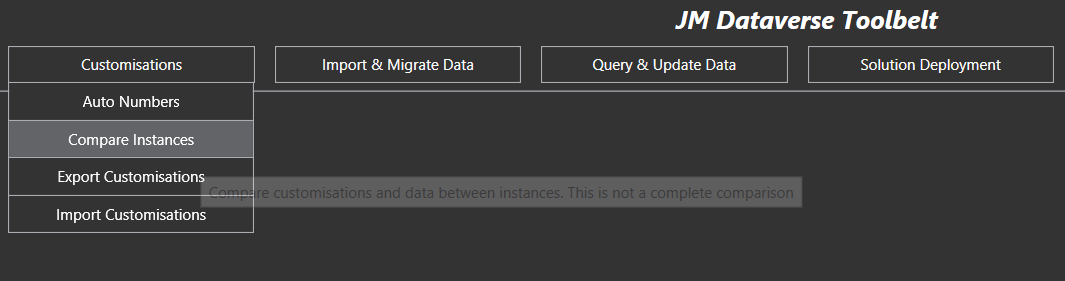
Cases where I have found value in this feature include
- Workflows and business rules not kept consistent between production and non-production environments. The feature identifies different activation states, different rules within the process, or where the customisation exists in one instance but not in the other
- Identifying differences in reference and configuration data between production and non-production environments
- Identifying components changed during a release cycle, but not included in a release package
- General checks of consistency between production and non-production environment
Note this feature does not compare every customisationtype. It only covers those I have implemented it for. Refreshing non-production instances from production is often a better option where instances have becomes too far divergent
The screenshot below shows option selected for a comparison. Note Web Resource takes the most time and volume of data to compare so ensure to exclude it where not required

Example output summary of the process is shown below (for completely different instances)
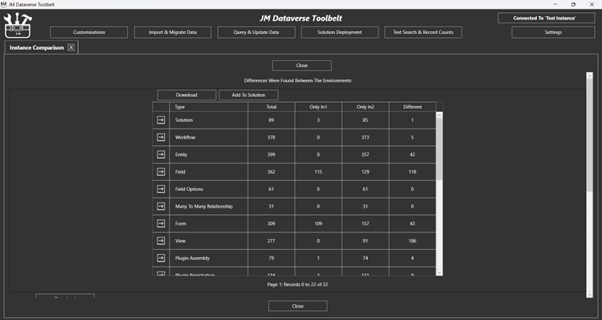
With details of each specific further down the form. This detailed report can be exported to Excel for further inspection of specific differences

 JM SOFTWARE