The switch conditions type populates a column from the first match amongst a set of filters. Up to 8 ordered filters, each continuing a range of conditions, can be defined using FetchXml filters
Each FetchXml filter switch is paired with a value for when it is the matching result. Value types have the flexibility of being either another column, an explicit value, the modified-on date, the modified by user, or simply clearing out the value
Using switch conditions each with nested and/or conditions means relatively complicated business logic can be implemented by the switch conditions with minimal customisation effort and no custom code
This example below will have a simple switch with only 2 real condition. I have a picklist field for contact title
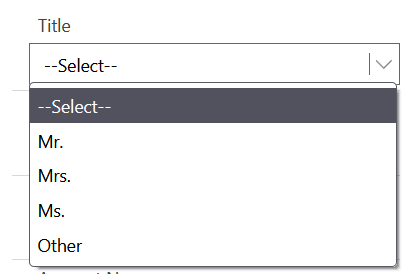
If none of the predefined options matches the contact title, the user can select other and enter a specific title string
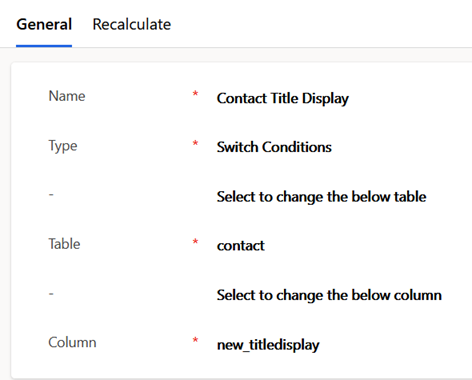
To create a calculated field of type concatenate, enter the type, table, and column to auto-populate. in the first general section. This example will populate a field title display with the title selected from a picklist, unless other is selected in which case a different string field for a custom title
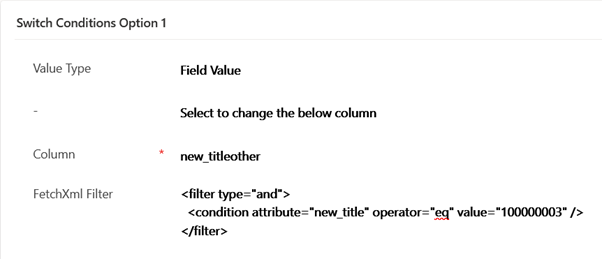
The first switch condition states if other is selected then resolve the value to that in the other title field. For this example, 100000003 in the condition represents the value for the other option in the picklist
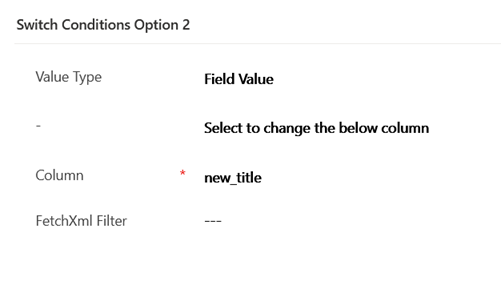
In this basic example the second switch does not need a filter at all, as if the first filter was not matched, we just use the title picklist value
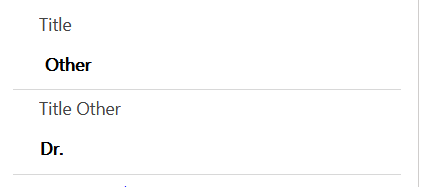
This screenshot shows the Outcome of the Calculated Field for the 2 variations in the switch. The first have used the selected title, while the other has used the other title

 JM SOFTWARE