The recalculate feature can be used to ensure that all records get refreshed to be populated with a value consistent with the calculated field configuration. The process will iterate through all records in the system, run the calculation, and where necessary update it so the value is accurate with the current state of the calculated field
This is particularly useful when creating a new calculated field where records already exist, or when changing the rules for an existing calculated field
Triggering Recalculation
To run the recalculate process, in the calculated field form navigate to the recalculate tab, then click the recalculate all checkbox and save
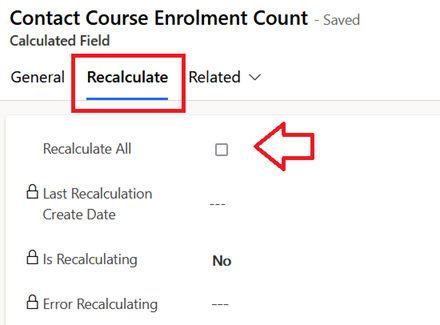
When a recalculation process has been triggered, ensure to monitor that the system jobs run to completion in the sub grid

Recovering Generation Failure
The process which generates field change history from audit history is known to fail on occasions where there is a large volume of data and it takes a long time to generate the records
The process itself is a recursive workflow which generates the history records in batches with a duration of no more than 2 minutes each. If an operation within the workflow unexpectedly fails, or there is a timeout due to platform activity, then that error will cause the generation process to fail
Assuming this is a transient error this is not a terminal problem, and the generation process ca simply be resumed by repeating the aforementioned process of setting the generate field on the field change configuration record
Since the process uses an anchor field “Last Generation Creation Date” it will start a new system job for resume where it left off. There I also logic within the process to prevent duplicates being created for the same field change occurrence
 JM SOFTWARE