The math expression calculation populates the result of a division, multiplication, addition or subtraction operation on 2 values. The values used for the math expression may be either other column values, or values explicitly defined in configuration
When creating a math expression calculated field enter the type, and the table and column of the field to populate in the first section
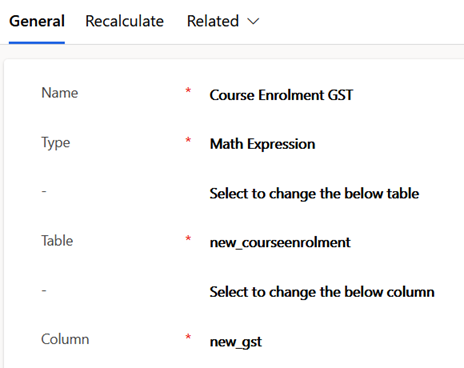
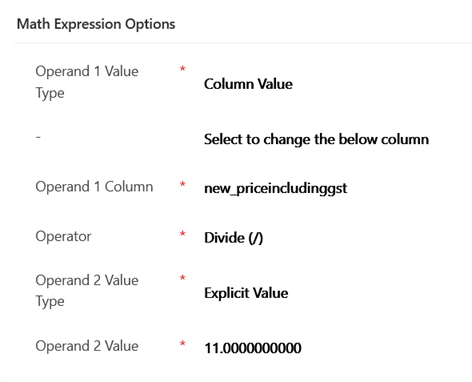
This example (only for demonstration purposes) calculates the Australian GST part of a price which includes GST. This tax is 10% in Australia so for the example price including GST is divided by 11 which is equivalent
This example demonstrates using both a column value and an explicit value for the operands in the math expression
A second example here calculates price excluding GST
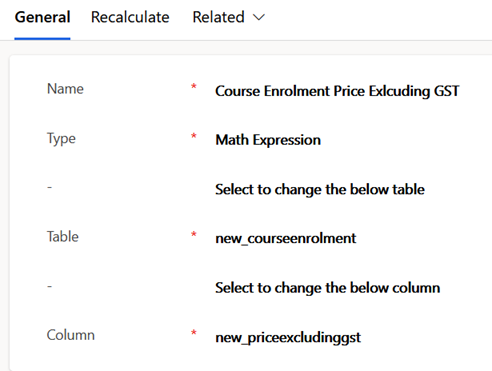
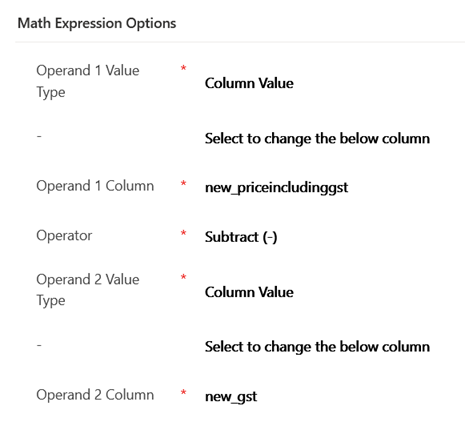
This math expression for this uses 2 column values in subtracting GST from the price including GST, and is an example where multiple calculations can be chained together
Note at time of writing rounding between calculations is not explicitly implemented by the solution for math expressions, so more complex chained expressions where decimal precision is required to retain accuracy in totals should be avoided
This screenshot shows an example of these calculations on a course list price of $299

 JM SOFTWARE