This article details a micro solution for Dynamics 365 I have created and added to github here. A managed version of the dynamics 365 solution can be found here
The solution contains a web resource which may be added to the email and appointment forms to simplify adding file attachments. OOTB the attachments grid requires several clicks and forms for adding an attachment, and they need to be done one by one. This resource provides the ability to drag/drop, or select multiple files for attachment without requiring to go through the attachment dialog
Note I have not added the ability to remove, clear or perform any actions other than adding new attachments just to keep the resource simple
This solution was implemented on Microsoft Dynamics Version 8.2 and will not work on earlier versions
This screenshot shows the web resource in action in the Customer Service Hub. You see files may be dropped within the drop space, or selected using the Browse button. Once the files have been added in the web resource click Attach to add them to the Email
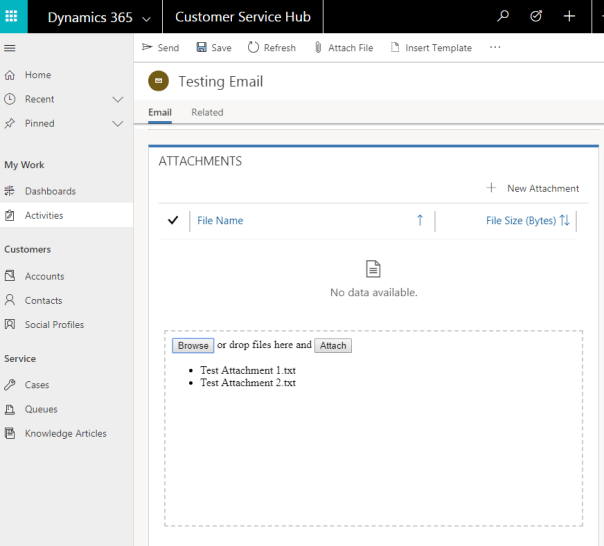

Configuration of the resource is shown in the screenshots below. The first screenshot shows I have inserted the web resource on the email form below the attachments grid.
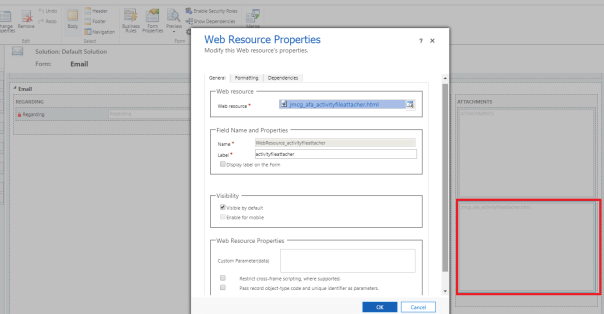
This second screenshot shows several relevant settings on the second tab of the web resource properties

In terms of the implementation it is relatively basic. Jquery is used for manipulating html including the drag/drop capability, and the Dynamics 365 WebAPI is used to create the attachments when the Attach button is clicked
Feel free to grab the code off github and use it if you wish, otherwise if you are happy to use the solution as is just install the managed solution
 JM SOFTWARE